Multi-container System + Reverse Proxy (consolidation)

For me, DevOps isn't just a job — it's a craft. I derive genuine excitement from turning tedious manual tasks into automated workflows that run like clockwork. As a junior DevOps engineer, I've already made tangible impacts, like implementing a Jenkins CI/CD pipeline that cut deployment times by 30% and significantly reduced release-day errors.
𝗞𝗲𝘆 𝗦𝗸𝗶𝗹𝗹𝘀 & 𝗔𝗰𝗵𝗶𝗲𝘃𝗲𝗺𝗲𝗻𝘁𝘀
𝗔𝘂𝘁𝗼𝗺𝗮𝘁𝗶𝗼𝗻 & 𝗖𝗜/𝗖𝗗: Built and maintained continuous integration pipelines (Jenkins, GitHub Actions) that accelerated deployment cycles by eliminating manual steps, saving ~5 hours per week.
𝗖𝗹𝗼𝘂𝗱 𝗜𝗻𝗳𝗿𝗮𝘀𝘁𝗿𝘂𝗰𝘁𝘂𝗿𝗲 (𝗔𝗪𝗦): Deployed and managed scalable applications on AWS using infrastructure as code (Terraform), ensuring consistent environments and smooth rollouts.
𝗖𝗼𝗻𝘁𝗮𝗶𝗻𝗲𝗿𝗶𝘇𝗮𝘁𝗶𝗼𝗻 & 𝗢𝗿𝗰𝗵𝗲𝘀𝘁𝗿𝗮𝘁𝗶𝗼𝗻: Implemented containerization with Docker and orchestrated services using Kubernetes, enabling microservice architectures and seamless deployments.
I approach each challenge with a humble mindset — there's always a new tool or technique to master — but also with the confidence that I can devise effective solutions. I've thrived in globally distributed teams and am adept at remote collaboration, using clear communication to keep projects on track across time zones. Ultimately, I'm on a mission to bridge the gap between development and operations to help teams deliver reliable software faster. I'm excited to continue growing as a DevOps professional. My goal is to bring my energy, curiosity, and commitment to excellence to a forward-thinking remote team that values continuous improvement and innovation.
🎯 What this project consolidates
You already know CI/CD. Now we consolidate runtime architecture.
You will practice:
Docker Compose (real-world usage)
Service-to-service communication
Reverse proxying with Nginx
Port isolation (security thinking)
Clean project structure
Debugging container networking (a core DevOps skill)
🧱 What we will build
Browser
   ↓
Nginx (port 8080)
   ↓
App container (internal only)
📂 Project structure (professional)
project-2-multicontainer/
├── app/
│   ├── app.js
│   ├── package.json
│   └── Dockerfile
├── nginx/
│   └── nginx.conf
├── docker-compose.yml
└── README.md
🧪 Outcome (what you should be able to say)
“I run applications behind an Nginx reverse proxy using Docker Compose, isolating services and exposing only the gateway.”
🧱 CLASS 1 — PROJECT SETUP (START HERE) Step 1: Create project directory
cd ~/OneDrive/Desktop
mkdir project-2-multicontainer-v2
cd project-2-multicontainer-v2
Initialize git:
git init
Step 2: Create folders
mkdir app nginx
Step 3: Create docker-compose.yml
code docker-compose.yml
Paste exactly:
services:
  app:
    build: ./app
    container_name: app
    expose:
      - "3000"

  nginx:
    image: nginx:alpine
    container_name: nginx
    ports:
      - "8080:80"
    volumes:
      - ./nginx/nginx.conf:/etc/nginx/nginx.conf:ro
    depends_on:
      - app
Save.
🧱 PROJECT 2 v2 — CLASS 2 Build the App Container + Configure Nginx Reverse Proxy
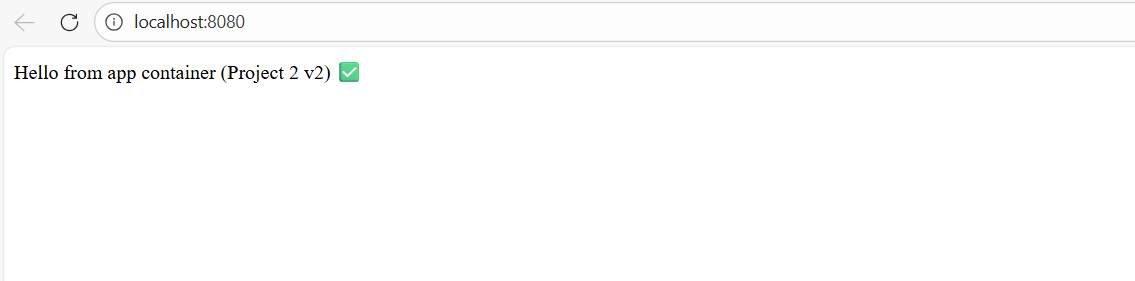
Goal: When you open http://localhost:8080, you see a message served by the app container, through Nginx.
1) Create the Node app (inside app/)
Go into app folder:
cd app
npm init -y
npm i express
Create app.js:
code app.js
Paste:
const express = require("express");
const app = express();

app.get("/", (req, res) => {
  res.send("Hello from app container (Project 2 v2) ✅");
});

app.listen(3000, () => console.log("App running on port 3000"));
Create Dockerfile (inside app/):
code Dockerfile
Paste:
FROM node:18-alpine

WORKDIR /app

COPY package*.json ./
RUN npm ci --only=production

COPY . .

EXPOSE 3000

CMD ["node", "app.js"]
Go back to project root:
cd ..
2) Create Nginx config (inside nginx/)
Create nginx/nginx.conf:
code nginx/nginx.conf
Paste:
events {}

http {
  server {
    listen 80;

    location / {
      proxy_pass http://app:3000;
    }
  }
}
✅ Key part: proxy_pass http://app:3000;
app is the service name from docker-compose. At this stage make sure your Docker Desktop is up and running.
3) Run the stack
From project root:
docker compose up --build
Open browser:
Expected: Hello from app container (Project 2 v2) ✅
Stop:
Ctrl + C
Then clean up:
docker compose down

🧱 PROJECT 2 v2 — CLASS 3 Add Health Checks + Make Nginx “Production-ish”
Goal: Add /health endpoint + improve Nginx proxy settings + verify using curl and logs.
1) Add /health endpoint (App)
Open app/app.js:
code app/app.js
Update it to this (keep your existing / route too):
const express = require("express");
const app = express();

app.get("/", (req, res) => {
  res.send("Hello from app container (Project 2 v2) ✅");
});

app.get("/health", (req, res) => {
  res.status(200).send("OK");
});

app.listen(3000, () => console.log("App running on port 3000"));
Save.
2) Improve Nginx config (headers + timeouts)
Open:
code nginx/nginx.conf
Replace with:
events {}

http {
  upstream app_upstream {
    server app:3000;
  }

  server {
    listen 80;

    location / {
      proxy_pass http://app_upstream;

      proxy_http_version 1.1;
      proxy_set_header Host $host;
      proxy_set_header X-Real-IP $remote_addr;
      proxy_set_header X-Forwarded-For $proxy_add_x_forwarded_for;
      proxy_set_header X-Forwarded-Proto $scheme;

      proxy_connect_timeout 5s;
      proxy_read_timeout 30s;
      proxy_send_timeout 30s;
    }
  }
}
Save.
3) Rebuild and run
From project root:
docker compose up --build
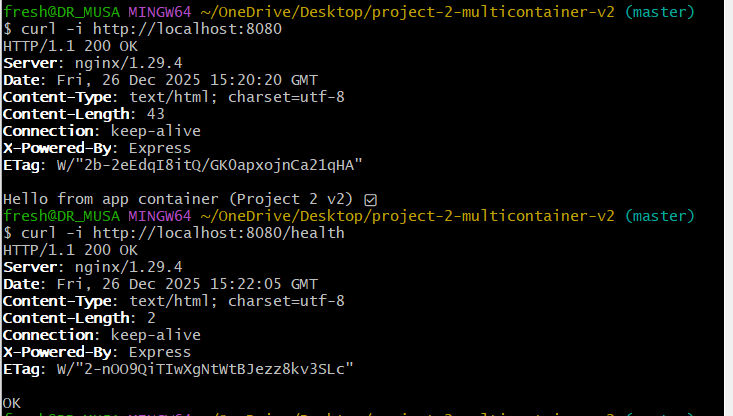
4) Verify via curl (proof)
In a new terminal tab:
curl -i http://localhost:8080/
curl -i http://localhost:8080/health
Expected:
/ returns 200 and your message
/health returns OK
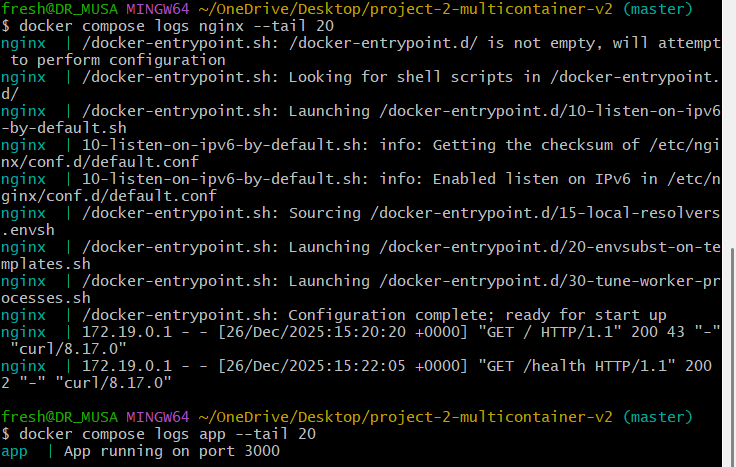
5) Check logs (bonus skill)
docker compose logs nginx --tail 20
docker compose logs app --tail 20
6) Stop and clean
Ctrl + C then:
docker compose down

🧱 PROJECT 2 v2 — CLASS 4 Publish to GitHub + Add CI (recruiter-ready)
Goal: Put this project on GitHub with a clean README and a CI workflow that validates the Node app.
1) Initialize git (if not already) + check status
From project root (project-2-multicontainer-v2):
git status
If it says “not a git repository”, run:
git init
git branch -M main
2) Create a recruiter-friendly README (short, strong)
Create/open:
code README.md
Paste:
# Project 2 v2 — Multi-Container App with Nginx Reverse Proxy (Docker Compose)

A production-style multi-container setup where a Node.js app runs privately behind an Nginx reverse proxy.

## Architecture
Browser → Nginx (8080) → App (internal:3000)

## What this demonstrates
- Docker Compose orchestration
- Reverse proxying with Nginx
- Service-to-service networking via Compose
- Health checks (`/health`) for operational readiness

## Run locally

`docker compose up --build`

**3) Run curl in a NEW terminal tab/window**

Open a new Git Bash window/tab and run:
curl -i http://localhost:8080/health
curl -i http://localhost:3000
**4) Stop containers when done**

Go back to the terminal running compose and press:
Ctrl + C
docker compose down


